ARP(Adress Resolution Protocol)
I hope this article is useful for you. Happy reading. :) ARP (Adress Resolution Protocol) is used to determine the MAC addresses of devices on a local network…

Hello everyone :) I hope this article is useful for you. Happy reading. :)
**ARP(**Address Resolution Protocol) is used to determine the MAC addresses of devices on a local network whose IP address is known but whose MAC address is not. The reason we need to determine these MAC addresses is that devices on a local network communicate with each other using MAC addresses. In other words, when a device wants to communicate with another device whose IP address it knows but whose MAC address it doesn’t, it aims to discover that MAC address using the Address Resolution Protocol - ARP.
To learn the MAC address of a device on the local network whose IP address is known but whose MAC address isn’t, the source machine sends a message to all other machines on the network. This message contains the following 3 pieces of information:
- The IP address of the device sending the message
- The MAC address of the device sending the message
- The IP address of the device whose MAC address is being requested
To learn the MAC address of a device on our network whose IP address we know but whose MAC address we don’t, we send a message to that device. However, since we don’t know its MAC address, the message we send also goes out to all other devices. Since those other devices have a different IP address, they discard the message they received. The device whose MAC address is being requested sends back a response packet. This response packet contains the device’s MAC address. So that the same process doesn’t have to be repeated every time, the device that was queried keeps track of which MAC address corresponds to which IP address, storing the IP and MAC address from the response internally. As a result, our device won’t need to send out a broadcast every time, meaning it won’t have to send a message to every device. The tables where IP and MAC addresses are kept are called the ARP table.
If we also want to record the IP and MAC addresses of other devices on the network we’re connected to in our own device’s ARP table, we can follow the steps below.
- First, let’s use the “ifconfig” command to check what ethernet interface we’re using.
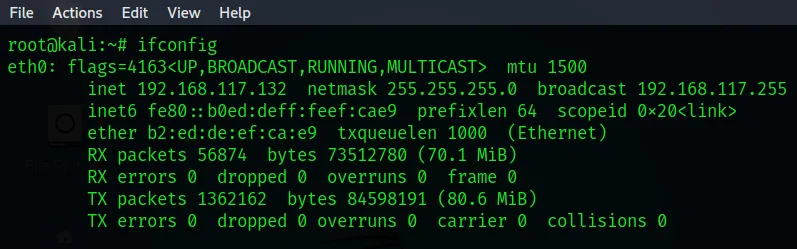
From the information above, we learned that our interface is “eth0”. Here, “eth” stands for ethernet. The “0” is used to distinguish between interfaces when there is more than one ethernet interface.
In other words, if there were multiple different ethernet interfaces, they would go “eth0”, “eth1”, “eth3”, and so on.
- With the command below, we can record the IP and MAC addresses of all devices on the network we’re connected to, via the interface we’re using, into our ARP table.
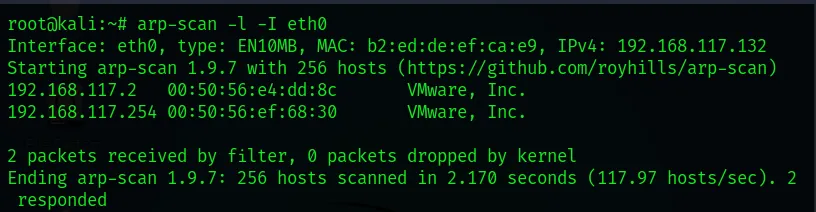
With the command above, we added the IP and MAC addresses of the other devices on the network to our ARP table.
- On our Linux devices, typing the “arp” command is enough to view the ARP table.

- On our Windows devices, to do the same thing, meaning to view the ARP table, typing the “arp -a” command is enough.
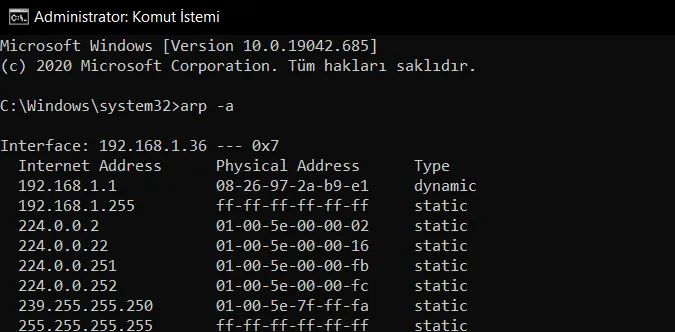
We don’t necessarily need to send a broadcast, i.e. a message to every device, in order to add the IP and MAC addresses of other devices on our network to the ARP table. If we already have the IP and MAC information at hand, it’s possible to enter this information into our device manually.
We can manually add MAC addresses to the ARP table by typing the following commands;
- On Linux/Unix devices
root@kali: # arp -s (ip address) (mac address)
- On Windows devices
C:\ Windows\system32> arp -s (ip address) (mac address)