DeepBlueCLI: Threat Hunting with the PowerShell Module
In this article I'll demonstrate threat hunting using the DeepBlueCLI module developed by Eric Conrad. DeepBlueCLI is a PowerShell module for Windows…

Hello everyone. :)
In this article I’ll demonstrate threat hunting using the DeepBlueCLI module developed by Eric Conrad.
DeepBlueCLI is a PowerShell module used to automatically parse Windows event logs — either as a PowerShell module on Windows or inside ELK (Elasticsearch) — and to perform threat hunting through Windows Event Logs.
We start by opening a terminal on our system. Then we go to the location where our DeepBlueCLI module is.
C:\tools>cd \tools\DeepBlueCLI-masterDeepBlueCLI is a PowerShell module, so first we need to launch it. To do that, we use the command below.
C:\tools\DeepBlueCLI-master>powershellTo run this tool without being blocked by a firewall or antivirus, we need to run the following command.
For more information, you can check the Set-ExecutionPolicy Readme.
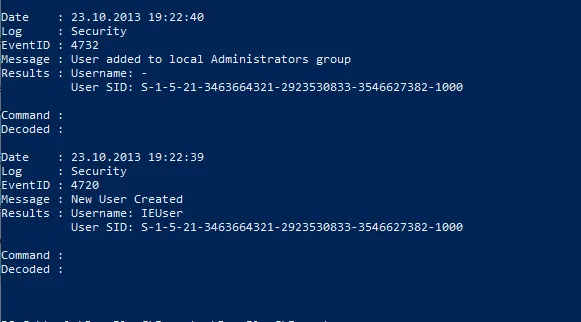
PS C:\tools\DeepBlueCLI-master> Set-ExecutionPolicy unrestrictedOne of the methods commonly used by attackers on compromised systems is adding a user to the system. This gives them a form of persistence that malware alone wouldn’t provide.
Now let’s check an .evtx file for a newly added user.
C:\tools\DeepBlueCLI-master>.\DeepBlue.ps1 .\evtx\new-user-security.evtx
Another attack that few SIEMs detect is password spraying. This is where an attacker takes a list of users and sprays the same password against all of them.
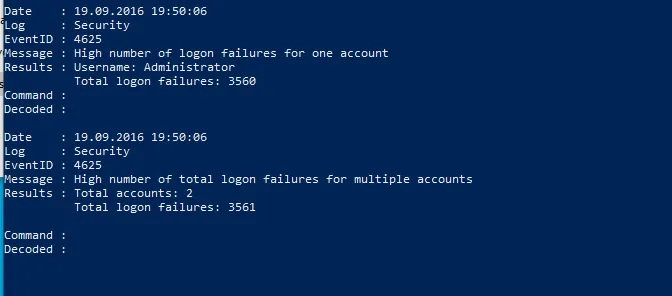
Let’s now examine an event log with content similar to this.
PS C:\tools\DeepBlueCLI-master>.\DeepBlue.ps1 .\evtx\smb-password-guessing-security.evtx
Another command used to detect a password spraying attack is as follows.
PS C:\tools\DeepBlueCLI-master>.\DeepBlue.ps1 .\evtx\password-spray.evtx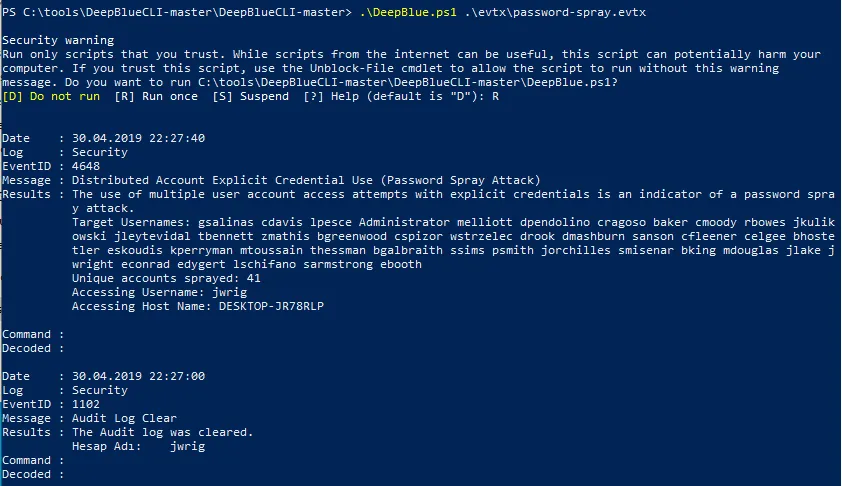
Encoding techniques used by attackers to evade signature detection are extremely common.
Let’s try to see how DeepBlueCLI detects the various encoding tactics attackers use to hide their attacks.
PS C:\tools\DeepBlueCLI-master>.\DeepBlue.ps1 .\evtx\Powershell-Invoke-Obfuscation-encoding-menu.evtx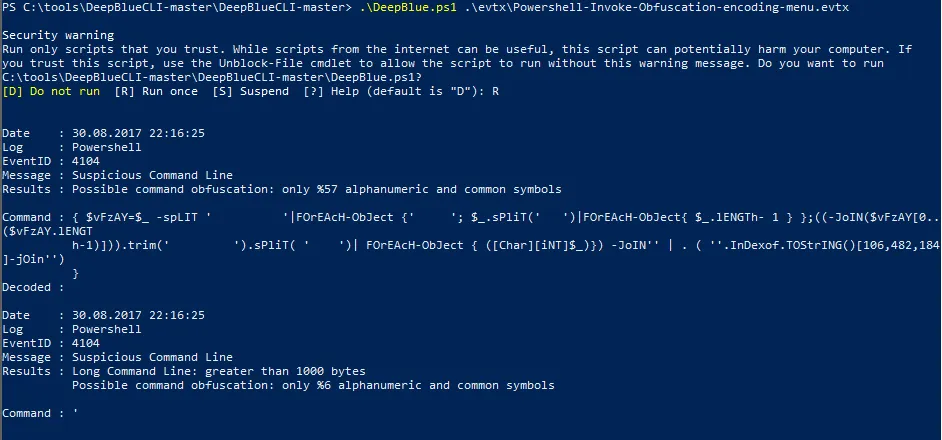
To manipulate the event log;
.\DeepBlue.ps1 .\evtx\disablestop-eventlog.evtx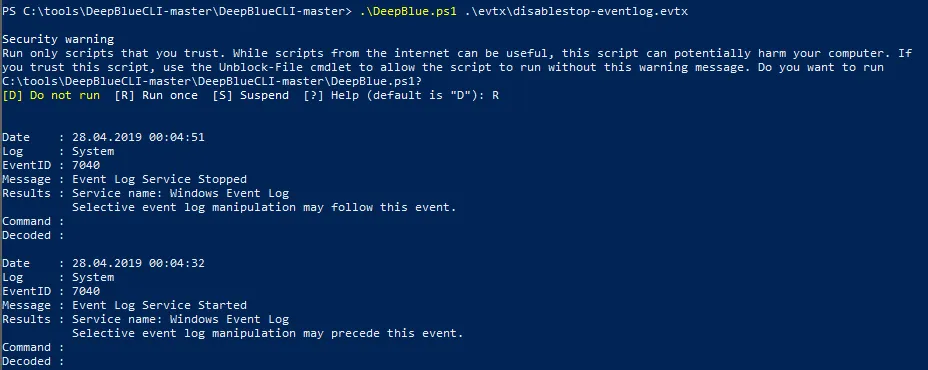
Metasploit native target (security);
.\DeepBlue.ps1 .\evtx\metasploit-psexec-native-target-security.evtx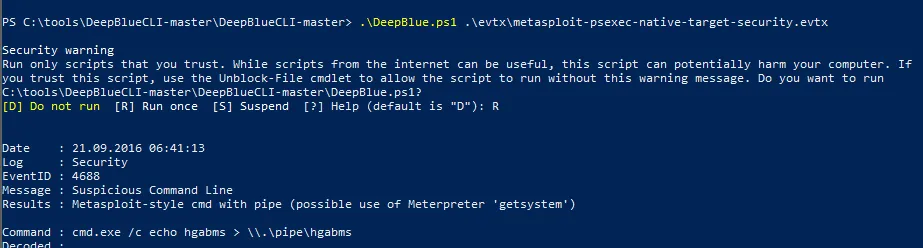
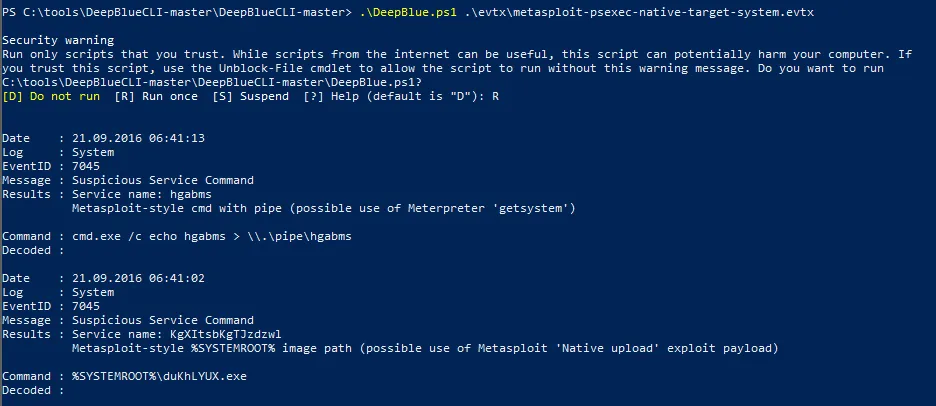
Metasploit native target (system);
.\DeepBlue.ps1 .\evtx\metasploit-psexec-native-target-system.evtx
DeepBlueCLI allows for a variety of output methods and types for PowerShell objects, including JSON, HTML, CSV, and more.
Among these, one of the best known is GridView.
.\DeepBlue.ps1 .\evtx\psattack-security.evtx | Out-GridView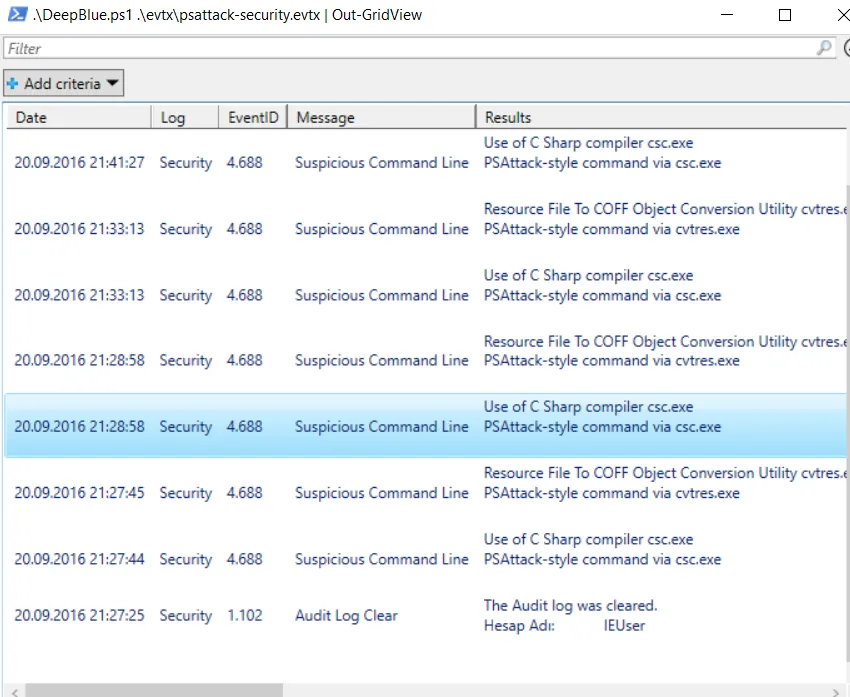
Other Event Commands
| Event | Command |
|---|---|
| Event log manipulation | .\DeepBlue.ps1 .\evtx\disablestop-eventlog.evtx |
| Metasploit native target (security) | .\DeepBlue.ps1 .\evtx\metasploit-psexec-native-target-security.evtx |
| Metasploit native target (system) | .\DeepBlue.ps1 .\evtx\metasploit-psexec-native-target-system.evtx |
| Metasploit PowerShell target (security) | .\DeepBlue.ps1 .\evtx\metasploit-psexec-powershell-target-security.evtx |
| Metasploit PowerShell target (system) | .\DeepBlue.ps1 .\evtx\metasploit-psexec-powershell-target-system.evtx |
Mimikatz lsadump::sam |
.\DeepBlue.ps1 .\evtx\mimikatz-privesc-hashdump.evtx |
| New user creation | .\DeepBlue.ps1 .\evtx\new-user-security.evtx |
| Obfuscation (encoding) | .\DeepBlue.ps1 .\evtx\Powershell-Invoke-Obfuscation-encoding-menu.evtx |
| Obfuscation (string) | .\DeepBlue.ps1 .\evtx\Powershell-Invoke-Obfuscation-string-menu.evtx |
| Password guessing | .\DeepBlue.ps1 .\evtx\smb-password-guessing-security.evtx |
| Password spraying | .\DeepBlue.ps1 .\evtx\password-spray.evtx |
| PowerSploit (security) | .\DeepBlue.ps1 .\evtx\powersploit-security.evtx |
| PowerSploit (system) | .\DeepBlue.ps1 .\evtx\powersploit-system.evtx |
| PSAttack | .\DeepBlue.ps1 .\evtx\psattack-security.evtx |
| User added to administrator group | .\DeepBlue.ps1 .\evtx\new-user-security.evtx |
Output Formats
| Output Type | Syntax |
|---|---|
| CSV | `.\DeepBlue.ps1 .\evtx\psattack-security.evtx |
| Format list (default) | `.\DeepBlue.ps1 .\evtx\psattack-security.evtx |
| Format table | `.\DeepBlue.ps1 .\evtx\psattack-security.evtx |
| GridView | `.\DeepBlue.ps1 .\evtx\psattack-security.evtx |
| HTML | `.\DeepBlue.ps1 .\evtx\psattack-security.evtx |
| JSON | `.\DeepBlue.ps1 .\evtx\psattack-security.evtx |
| XML | `.\DeepBlue.ps1 .\evtx\psattack-security.evtx |
Thanks for reading this far. I hope it was useful. :)