Hunting for Persistence: Registry Run Keys / Startup Folder
In this article, I will try to explain a technique used by attackers to establish persistence on target systems, corresponding to ATT&CK ID T1547.001 in the MITRE ATT&CK…

Hello everyone, in this article I will try to explain a technique used by attackers to establish persistence on target systems, corresponding to T1547.001 ATT&CK ID in the MITRE ATT&CK matrix, known as Boot or Logon Autostart Execution: Registry Run Keys / Startup Folder.
After attackers gain their initial foothold on systems, they want to secure themselves so they can maintain access to those systems. In short, their goal is to keep their persistence on the systems going.
Persistence
Persistence refers to the methods that attackers or attacker groups use, after gaining initial access to target systems, to prevent that access from being interrupted.
When you research the methods used to achieve persistence on target systems, you’ll see that there are a great many techniques. For this, you can visit the MITRE ATT&CK page to do more detailed research.
Registry Run Keys / Startup Folder
The Registry and the Startup Folder are among the oldest yet most effective methods used by attackers to achieve persistence. Adding a new entry to the Run keys or creating a shortcut in the Startup Folder’s contents is enough to run our malicious code when the user logs on. Running our malicious code from these locations is sufficient to achieve persistence.
Now let’s go over some technical concepts covered in this article that are important for us.
- Registry: A database in Windows operating systems that holds information for hardware and programs, along with configuration and setup options.
- Key: Structures resembling folders that contain subkeys and values.
- Value: A data pair stored under keys.
- HKEY_LOCAL_MACHINE (HKLM): The root key where all settings and configurations for the local computer are stored. It contains 4 different keys: SAM, SECURITY, SYSTEM, and SOFTWARE. These settings are loaded at boot and apply to all users.
- HKEY_CURRENT_USER (HKCU): The root key that holds settings and configurations for the currently logged-on user. These settings are applied when the user logs on.
The T1547.001 ATT&CK technique involves adding a malicious file to the Startup directory or modifying a registry key so that the executable malicious command or file runs every time the system starts.
Default Startup directories:
- For logged-on users:
C:\Users[User Name]\AppData\Roaming\Microsoft\Windows\Start Menu\Programs\Startup
- For all users:
C:\ProgramData\Microsoft\Windows\Start Menu\Programs\StartUp
How Common Is This Persistence Method
Attempting to achieve persistence using registry run keys is one of the most common methods used by malware and attackers.
For example, Ryuk ransomware, responsible for some of the most damaging attacks worldwide, used registry run keys to achieve persistence.
Likewise, detailed research has shown that APT groups such as APT39, APT41, FIN7, and Gamaredon Group have also used registry run keys or startup folders to achieve persistence in their attacks.
Finally, it has been observed that more widely known malware families such as Emotet, Hancitor, and IcedID have used this technique many times.
1. “Run” and “RunOnce” Registry Keys:
The Run and RunOnce keys make programs run every time a user logs on to the system. For example, a piece of malware will run every time the system starts in order to achieve persistence.
The following registry keys are created by default:
HKCU\Software\Microsoft\Windows\CurrentVersion\RunHKLM\Software\Microsoft\Windows\CurrentVersion\RunHKCU\Software\Microsoft\Windows\CurrentVersion\RunOnceHKLM\Software\Microsoft\Windows\CurrentVersion\RunOnce
2. “RunServices” and “RunServicesOnce” Registry Keys:
These keys control the automatic startup of services running in the background. Attackers also add their own malware as a background service so that it runs like a legitimate service.
HKLM\Software\Microsoft\Windows\CurrentVersion\RunServicesHKCU\Software\Microsoft\Windows\CurrentVersion\RunServicesHKLM\Software\Microsoft\Windows\CurrentVersion\RunServicesOnceHKCU\Software\Microsoft\Windows\CurrentVersion\RunServicesOnce
3. “Shell Folders” and “User Shell Folders” Registry Keys:
These keys are used by attackers to set the location of the startup folder. That’s why they’re also referred to as the “Startup Folder”.
HKCU\Software\Microsoft\Windows\CurrentVersion\Explorer\Shell FoldersHKLM\Software\Microsoft\Windows\CurrentVersion\Explorer\Shell FoldersHKCU\Software\Microsoft\Windows\CurrentVersion\Explorer\User Shell FoldersHKLM\Software\Microsoft\Windows\CurrentVersion\Explorer\User Shell Folders
4. “Policies Run” Keys:
Policies Run keys are used to specify startup programs.
HKLM\Software\Microsoft\Windows\CurrentVersion\Policies\Explorer\RunHKCU\Software\Microsoft\Windows\CurrentVersion\Policies\Explorer\Run
5. Winlogon Registry Keys:
The following keys control the actions that take place when a user logs on.
HKLM\Software\Microsoft\Windows NT\CurrentVersion\Winlogon\Userinit: This normally points to userinit.exe. An adversary can replace the userinit.exe file with malicious executable code or add new entries pointing to the malware’s executable. As a result, this malicious executable can start up at system startup.HKLM\Software\Microsoft\Windows NT\CurrentVersion\Winlogon\Shell: This key normally points only to explorer.exe.HKLM\Software\Microsoft\Windows NT\CurrentVersion\Winlogon\Notify: This subkey is used to notify event handlers when a Secure Attention Sequence (SAS) (Ctrl+Alt+Del) occurs and a DLL is loaded. Adversaries modify this DLL file to load their malware.
6. BootExecute Registry Key:
HKEY_LOCAL_MACHINE\System\CurrentControlSet\Control\Session Manager:
The value in this BootExecute key is launched during boot. Although its default value is “autocheck autochk”, adversaries can add other commands, scripts, or programs to this value.
In this section, let’s cover how we can carry out and detect this attack from both a red team and blue team perspective. :)
Red Teaming
Terminal
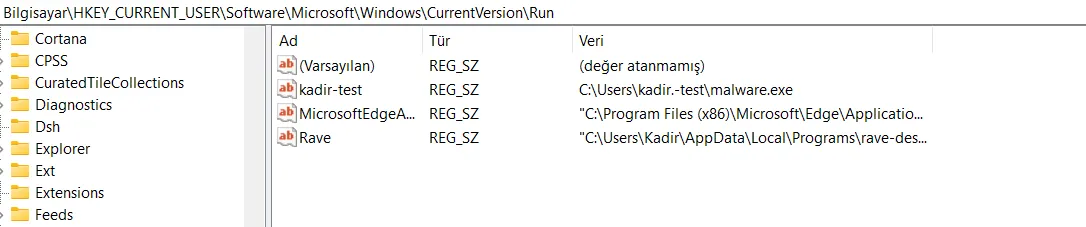
Registry keys for achieving persistence can be added from the terminal. These keys will execute when the user logs on. The commands I’ll give as examples below are used by attackers or attacker groups.
reg add "HKEY_CURRENT_USER\Software\Microsoft\Windows\CurrentVersion\Run" /v kadir-test /t REG_SZ /d "C:\Users\kadir.-test\malware.exe"
reg add "HKEY_CURRENT_USER\Software\Microsoft\Windows\CurrentVersion\RunOnce" /v kadir-test /t REG_SZ /d "C:\Users\kadir-test\malware.exe"
reg add "HKEY_CURRENT_USER\Software\Microsoft\Windows\CurrentVersion\RunServices" /v kadir-test /t REG_SZ /d "C:\Users\kadir-test\malware.exe"
reg add "HKEY_CURRENT_USER\Software\Microsoft\Windows\CurrentVersion\RunServicesOnce" /v kadir-test /t REG_SZ /d "C:\Users\kadir-test\malware.exe"
When we run the commands given above in our terminal, we can see, as shown in the screenshot below, that our malicious file was created at the target location we specified.

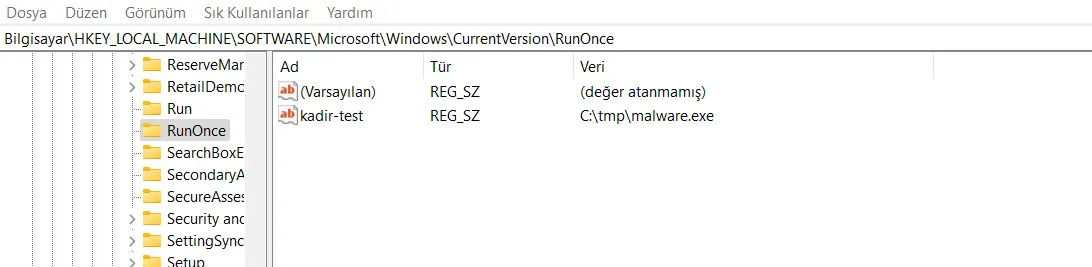
If credentials have been obtained, local machine registry locations are used, since the executable file will launch every time the system starts, independent of which user authenticates.
reg add "HKEY_LOCAL_MACHINE\Software\Microsoft\Windows\CurrentVersion\Run" /v kadir-test /t REG_SZ /d "C:\tmp\malware.exe"
reg add "HKEY_LOCAL_MACHINE\Software\Microsoft\Windows\CurrentVersion\RunOnce" /v kadir-test /t REG_SZ /d "C:\tmp\malware.exe"
reg add "HKEY_LOCAL_MACHINE\Software\Microsoft\Windows\CurrentVersion\RunServices" /v kadir-test /t REG_SZ /d "C:\tmp\malware.exe"
reg add "HKEY_LOCAL_MACHINE\Software\Microsoft\Windows\CurrentVersion\RunServicesOnce" /v kadir-test /t REG_SZ /d "C:\tmp\malware.exe"

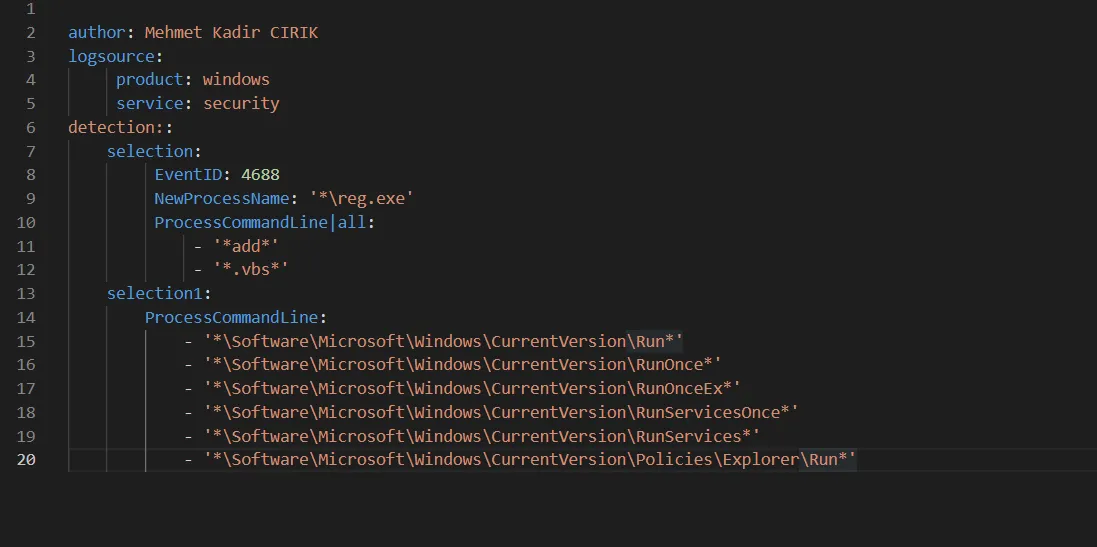
Blue Teaming
A rule like the one below can be written to detect attackers’ persistence activity. With this rule, the behaviors and actions performed by attackers are detected and any
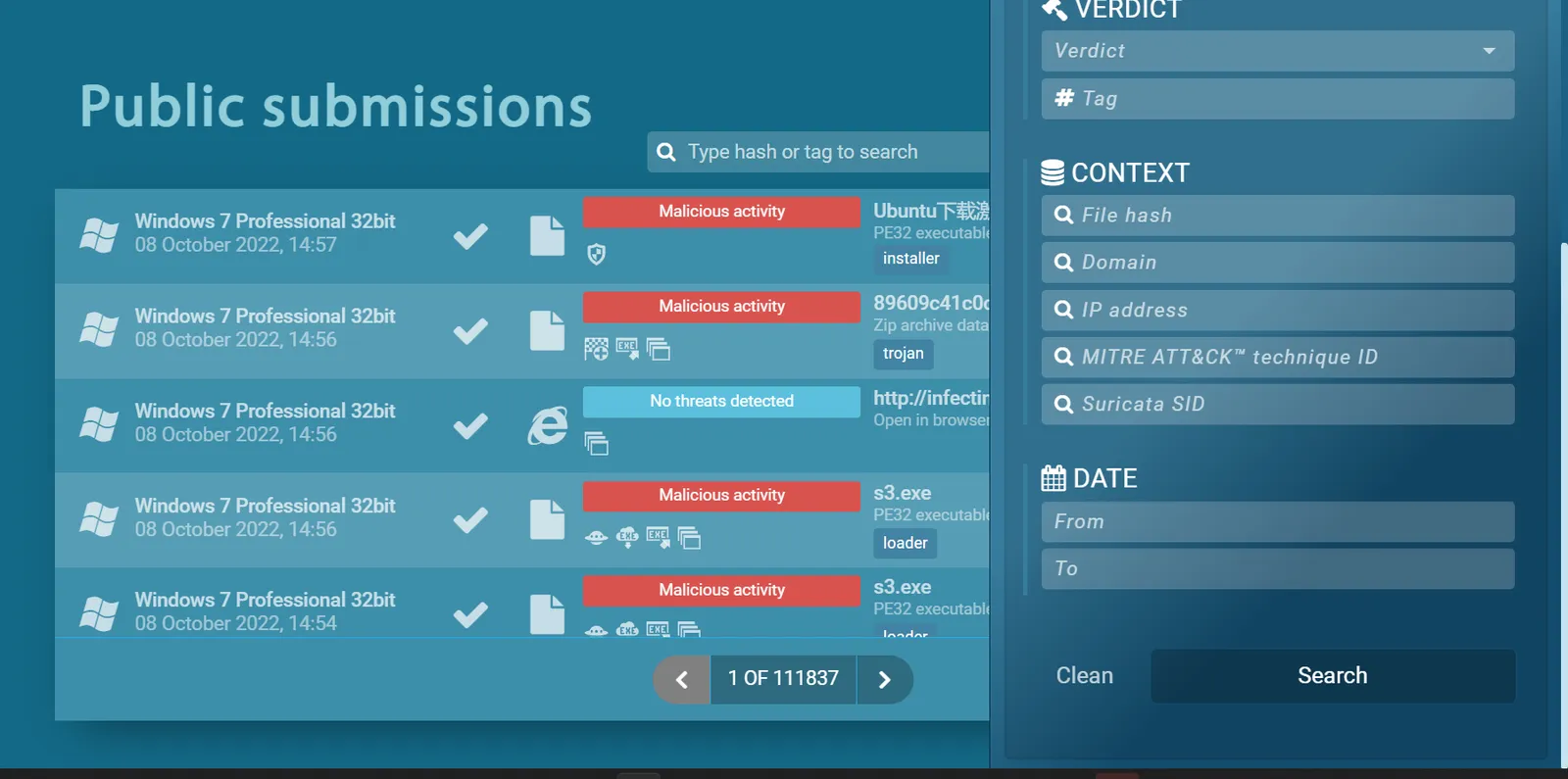
Finally, in the Any.run sandbox environment, you can filter publicly shared malware samples that use the T1547.001 technique using the filter below. You can also apply many other filters to examine sample procedures used by this malware.
Sources:
- https://attack.mitre.org/techniques/T1547/
- https://gelecegiyazanlar.turkcell.com.tr/blog/mitre-attck-t1547001-registry-run-keys-startup-folder-ile-kalicilik-saglama
- https://www.cyborgsecurity.com/threats/emerging-threats/ryuk-ransomware/
- https://dmcxblue.gitbook.io/red-team-notes/persistence/registry-keys-startup-folder