Methods of Threat Actors Adapting to the Post-Macro Era
Microsoft announced in October 2021 that it would start blocking XL4 and VBA macros by default for Office users, rolling this out in February 2022…

Greetings everyone, I’m Mehmet Kadir CIRIK.
Microsoft announced in October 2021 that it would start blocking XL4 and VBA macros by default for Office users, rolling this out starting in February 2022. These changes started being enabled in 2022. There was some confusion around the VBA macro blocking rollout in July 2022, but Microsoft announced that it would continue. In response to these changes, threat actors began moving away from macro-based threats.
According to campaign data from October 2021 onward that researchers analyzed following this announcement, threat actors moved away from macro-enabled documents attached directly to messages for delivering malware, and increasingly used ISO and RAR attachments along with Windows Shortcut (LNK) files.
Based on the conclusions I’ve drawn from many reports, according to the analysis of campaign threats that threat researchers manually analyzed and contextualized, the rate at which threat actors use macro-enabled attachments has dropped considerably.
Threat actors use VBA macros to automatically run malicious content when users enable macros in Office applications. XL4 macros are specific to Excel, but they can also be abused by threat actors.
Threat actors who distribute macro-enabled documents typically try to convince the recipient that the content is important and state that macros need to be enabled to view the content.
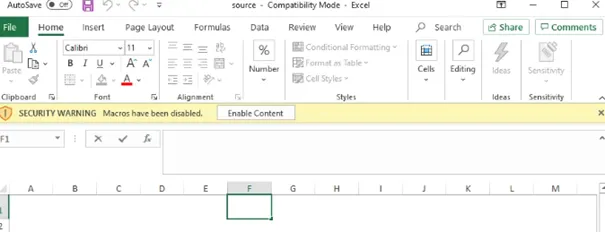
Figure 1: A macro-laden Excel attachment taken from a recent campaign.
Some threat researchers assumed that threat actors would start shifting away from macro-enabled documents attached directly to messages or downloaded via URL, in order to bypass the defenses recommended by Microsoft.
While sources have observed a notable increase in other attachment types, macro-enabled documents are still continuing to be used in the threat landscape.
Development:
Diversity in file types: As macro-based attacks have become less effective, malicious actors have started to favor container files such as ISO, RAR, and ZIP. These file types present a potential where users may open them carelessly and malicious code can be injected inside them. They have also developed their attacks by using Windows Shortcut (LNK) files. These file types can get users to click on deceptive links and let malware infect their computers.
Social engineering and targeted attacks: Threat actors continue to use social engineering tactics to trick users and to carry out targeted attacks. They draw users’ attention through methods such as customized emails, fake websites, and misleading file names. With these tactics, they try to build trust with users and convince them to enable malicious content. In doing so, they aim to achieve goals such as stealing users’ data, carrying out phishing attacks, or gaining unauthorized access to systems.
Zero-day attacks: Malicious actors focus on new weaknesses where vulnerabilities haven’t yet been discovered or patched. Such attacks, referred to as zero-day attacks, allow attackers to act quickly and carry out an attack before defensive measures have been updated. Zero-day attacks once again underline the importance of applying software and operating system updates in a timely and regular manner.
Bypassing Mark-of-the-Web (MotW)
Attackers can abuse certain file formats to break Mark of the Web (MOTW) checks. On Windows, when files are downloaded from the Internet, they’re tagged with a hidden NTFS Alternate Data Stream (ADS) called Zone.Identifier, which carries a specific value known as MOTW. Tagged files are protected by MOTW and can’t perform certain actions.
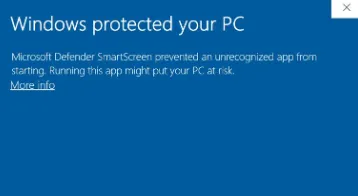
For example, starting with MS Office 10, an MS Office file opens in Protected View if it has MOTW. Executable files tagged with MOTW are processed by Windows Defender SmartScreen, which compares files against an allowlist of well-known executables. If the file is unknown/untrusted, SmartScreen blocks execution and warns the user not to run the file.
Attackers can abuse container files such as compressed/archive (.arj, .gzip) and/or disk image (.iso, .vhd) file formats to deliver malicious payloads that may not be tagged with MOTW. Container files downloaded from the Internet will be marked with MOTW, but the files inside them may not inherit MOTW once the container files are extracted or mounted. MOTW is an NTFS attribute, and many container files don’t support NTFS alternate data streams. Once a container file has been extracted and/or mounted, the files inside it can be treated as local files on disk and run without that protection.
As an example, let’s say you download a zip file. The zip file will be tagged with MOTW, but when you extract the files inside the zip, the extracted files may not be tagged with MOTW. That’s why this method is preferred by attackers.
Additionally, threat actors can use container files to deliver payloads directly. When container files are opened, they can contain additional content such as LNKs, DLLs, or executable (.exe) files that lead to the loading of a malicious payload.
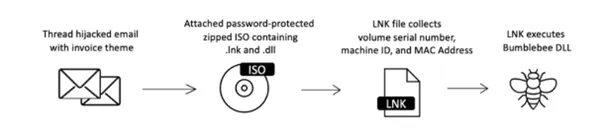
Figure 2: An example attack chain using ISO attachments to deliver the Bumblebee malware.
To see what MotW looks like, try downloading a file from a browser and you can inspect the file using PowerShell. For this example, I downloaded and inspected PuTTY.

3 ZoneId indicates that the file came from the “Internet Zone”.
When MotW is applied to a downloaded file, there are two types of prompts the user may see: those associated with SmartScreen’s low-reputation executables, and those for any file with a “high-risk” extension. The SmartScreen reputation prompt looks like this:
As an example, if we assume that attackers tried this technique and had a victim download an “img” file that landed in the Downloads folder, we might see an output like the following.
filemod_includes [.img]

&&

file_path_includes ['Users' & 'Downloads']  || [‘AppData’]
If we need to write a detection rule for this technique;
title: IMGExtension File Write to Suspicious Folders (via file_event)
id:
status: stable
description: This rule detects files with suspicious iso extensions written to user downloads folder or appdata folder.
references:
author: Mehmet Kadir CIRIK
tags:
- attack.defense_evasion
- attack.t1553.005
logsource:
category: file_event
product: windows
detection:
selection1:
TargetFilename|endswith: .iso
selection2:
TargetFilename|contains:
- Downloads
- appdata
condition: selection1 and selection2
falsepositives:
- Unknown
level: medium
we could write a detection rule along these lines. You can view the other threat rules I’ve written on the SOC Prime platform.
Campaign Statistics
Researchers observed a significant decline in macro-enabled documents used as attachments in email-based threats.
The number of these threats dropped by more than two-thirds between October 2021 and June 2022 alone. Over the same time period, the number of campaigns leveraging container files, including ISO and RAR, and Windows Shortcut (LNK) attachments increased by roughly 175%.
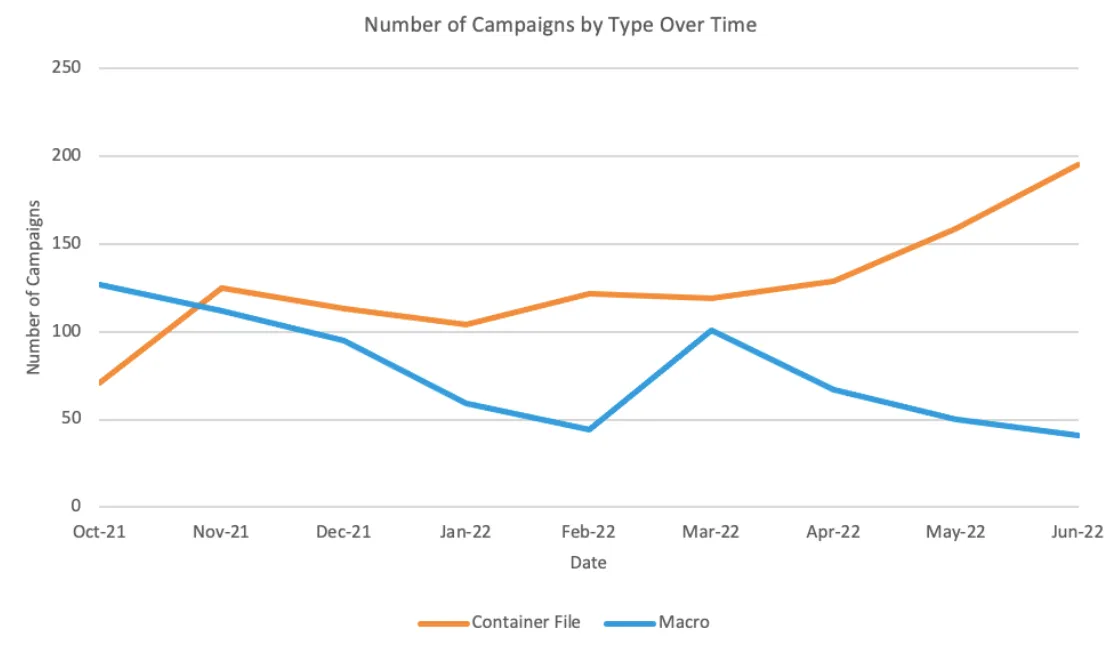
Figure 3: Number of campaigns leveraging container files versus macro-enabled documents as an email attachment.
Another notable change in the campaign data is the emergence of LNK files; many threat actors have started using LNK files since February 2022. The number of campaigns involving LNK files has been observed to increase by 1,675% since October 2021.
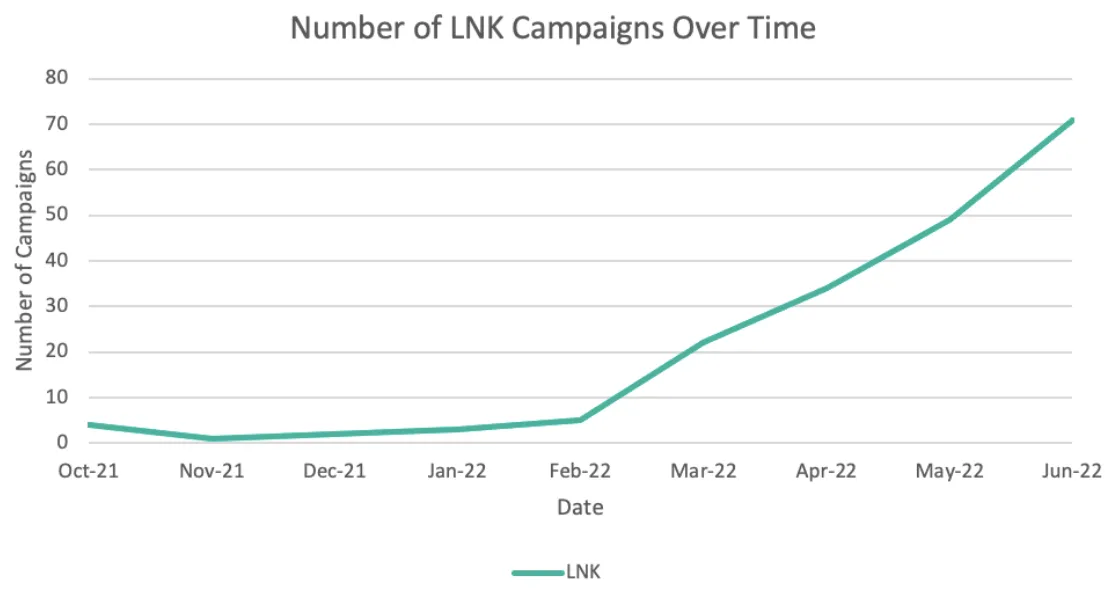
Figure 4: Number of campaigns leveraging LNK files.
As threat actors move away from macro-enabled documents for initial access, they’re increasingly turning to different file types across the threat landscape. This shift is associated with the adoption of ISO and other container file formats, as well as LNK files, which can bypass Microsoft’s macro-blocking protections. In addition to making it easier to distribute executables, these types of file formats can also lead to persistent malware, data discovery and theft, and even ransomware.
Key Takeaways:
- In response to Microsoft’s announcements that it would block macros by default in Microsoft Office applications, threat actors have started adopting new tactics, techniques, and procedures (TTPs).
- Threat actors are increasingly using container files such as ISO and RAR, as well as Windows Shortcut (LNK) files, in campaigns to distribute malware.
Thanks for reading this far. :)
Sources:
- https://www.bleepingcomputer.com/news/microsoft/microsoft-starts-blocking-office-macros-by-default-once-again/
- https://www.bleepingcomputer.com/news/microsoft/microsoft-is-disabling-excel-40-macros-by-default-to-protect-users/
- https://www.theregister.com/2022/02/08/microsoft\_office\_default\_macro\_block/
- https://attack.mitre.org/techniques/T1553/005/
- https://unprotect.it/technique/mark-of-the-web-motw-bypass/
- https://redcanary.com/threat-detection-report/techniques/mark-of-the-web-bypass/