Developing Sigma Rules
1. What Is a Sigma Rule? A Sigma rule is an open-source language and rule-set format used to detect and investigate security events and threats.…

1. What Is a Sigma Rule?
A Sigma rule is an open-source language and rule-set format used to detect and investigate security events and threats. Sigma is a standardization tool used by security professionals and cybersecurity analysts. These rules are used in SIEM (Security Information and Event Management) systems and security information systems used to capture and evaluate security events.
Sigma rules provide a language for defining security events and are used to monitor, analyze, and respond to those events. Sigma rules express a specific security threat or event and specify how that event should be triggered under certain conditions. These rules help security teams quickly identify and respond to potential threats.
Sigma rules are typically integrated into SIEM tools or security information systems used to identify and monitor security events. This way, a security team can quickly detect and, when necessary, respond to potential threats in their networks or systems.
In summary, a Sigma rule is a standardized language and rule-set format used to define and monitor security events, which helps cybersecurity teams manage threats more effectively.
2. The Importance of Attack Detection Rules
A Sigma rule is a format used to detect security events and attacks. Sigma is supported by the open-source Sigma project (https://github.com/Neo23x0/sigma) and is used to express data from various security information sources (such as IDS/IPS, security logs, WAF, etc.) in a single format and analyze that data.
Intrusion Detection Rules are rule sets used to detect abnormal activity in computer networks and systems. These rules specify certain conditions that trigger under a specific attack or security breach. For example, a large number of connection requests to a specific port, or network traffic matching a specific signature pattern.
By converting intrusion detection rules into a more universal format, Sigma lets different security systems (IDS/IPS, SIEM, log analysis tools, etc.) use the same rule set. This allows security professionals and analysts to detect and analyze events and attacks more effectively.
The importance of the Sigma rule can be summarized as follows:
- A Single Format, Support for Multiple Tools: Sigma is a format designed to be compatible with different security tools. This lets security analysts and professionals use the same rule set across different tools. As a result, they don’t have to keep recreating the same rule on different systems.
- Efficient Analysis and Investigation: A Sigma rule offers a more effective tool for analyzing and investigating security events and attacks. Rules expressed in a single format can speed up analysis processes and make it easier to reach more precise results.
- Community Contribution and Sharing: Sigma is an open-source project and is open to contributions from the security community. This lets security professionals, analysts, and researchers create their own rules, share them, and collaborate with other community members.
- Fast and Effective Response: A Sigma rule can be used to quickly detect and respond to abnormal activity. This can enable attacks or security breaches to be detected and responded to more quickly.
In conclusion, a Sigma rule is a format that helps create, manage, and use attack detection rules effectively. By using Sigma rules, security professionals and analysts can build a more secure environment, prevent attacks, and resolve security events more quickly.
3. Sigma Rule Structure and Syntax
The basic syntax for Sigma detection rules is as follows;
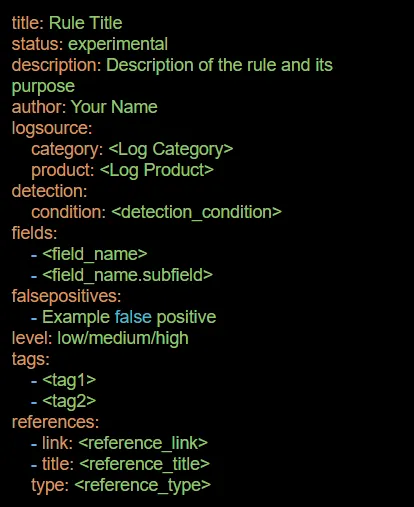
Let’s go over the core components:
title: The title of the Sigma rule. This defines the general purpose or scope of the rule.
status: The status of the rule. For example, it indicates states such as “experimental,” “test,” or “stable.”
description: A detailed explanation of what the rule detects and its purpose. This states what kind of events or conditions the rule monitors and what kind of threat it protects against.
author: The name or username of the person or user who created the rule.
logsource: Information about the source of the log data. It specifies which system or application produced the logs being monitored.
category: The category of the log. For example, “firewall,” “authentication,” etc.
product: The product or system that produced the log. For example, “Windows Security,” “Cisco ASA,” etc.
detection: The main detection logic for the rule. It specifies which patterns or behaviors the rule monitors to detect threats.
condition: The detection condition, written in a query language. For example, the Sigma Query Syntax or Elasticsearch Query DSL.
fields: The specific fields you want to extract or analyze from the log data. It specifies which data points are being examined.
Falsepositives: Situations in which the rule may produce false positives. In other words, the rule’s potential for incorrectly flagging unwanted conditions.
level: The severity level of the rule. For example, “low,” “medium,” “high,” etc.
tags: Tags or categories associated with the rule.
references: References to additional information about the detection or the threat it addresses.
Keep in mind that the syntax above is a simplified overview, and Sigma rules can include additional advanced features and options. When writing Sigma rules, you can follow up-to-date resources for the latest information and syntax details.
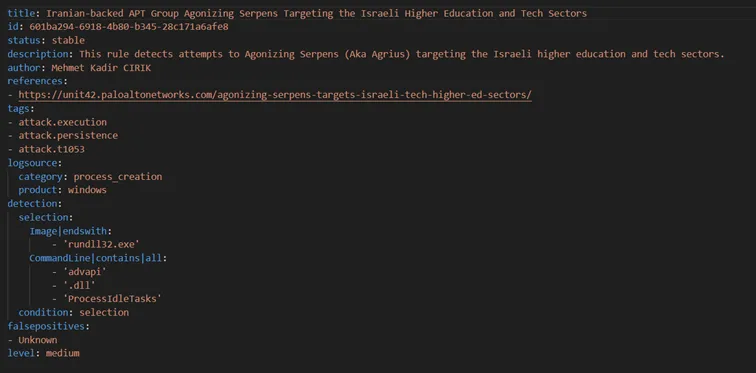
Example:
The image below shows the content of a sample Sigma rule. Examining the image in detail reveals more information about Sigma rule structure and syntax.
4. Mapping Sigma Rules to Sysmon
System Monitor (Sysmon) is a powerful tool used to understand and monitor the behavior of computer systems. Sysmon provides event IDs that define various events and actions, making it an important resource for security analytics, system security, and performance analysis. Sigma rules are written using these event IDs to define security events. In this article, we’ll cover the “category” field in particular, which is especially important for understanding how Sigma rules map to Sysmon event IDs.
The Importance of the “Category” Field in Sigma Rules
When writing Sigma rules, categorizing and classifying events is important. This helps make security analytics rules more effective and understandable. In Sigma rules mapped to Sysmon, this categorization is generally based on Sysmon event IDs.
Example Categories and Their Related Sysmon Event IDs
1. Process Creation:
- Category: process_creation
- Sysmon Event ID: 1
- Description: This rule triggers when a new process is created. It’s especially important for malware analysis and threat detection.
2. File Event:
- Category: file_event
- Sysmon Event ID: 2
- Description: File-related events, such as file creation or deletion, fall under this rule.
3. Image Load:
- Category: image_load
- Sysmon Event ID: 7
- Description: Used to detect when a DLL or exe file is loaded by a new process or service.
4. Registry Event:
- Category: registry_event
- Sysmon Event ID: 13
- Description: Used to monitor events related to the Windows registry and detect valuable information.
Writing Sigma Rules by Category
When writing Sigma rules, it’s important to know which Sysmon event ID falls under a given category. For example, if you want to detect new process creation events, you can create a Sigma rule with “category: process_creation”.
Conclusion
Sigma rules mapped to Sysmon are a powerful tool for monitoring important events on computer systems and performing security analytics. Using categorized Sigma rules makes it easier to understand and manage security analytics rules. Focusing on categories via Sysmon event IDs in particular is an important step toward defining specific security scenarios more effectively. Using this information, organizations can improve their security and be better prepared against potential threats.
5. Process Creation
Sysmon Event ID 1 represents the process creation event. This event is logged when a program or service is started. The process creation event contains information related to the launch of a new process, so you can see details such as which program is running, which user account launched it, and with what parameters the process was started. This information can be used for purposes such as system monitoring, malware detection, and analyzing system activity.
For example, if you’re going to write a rule in the “process creation” category like the one below, the related fields can be reached via sysmon event ID = 1.
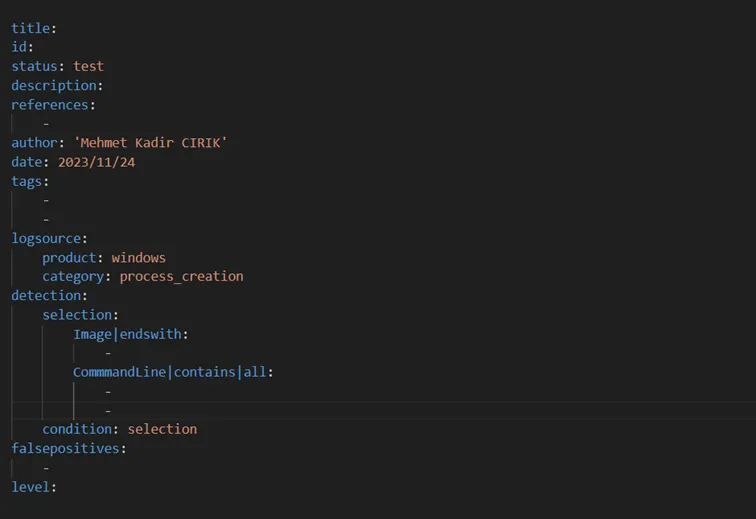
You can see the details of a sample “process_creation” rule I wrote below.
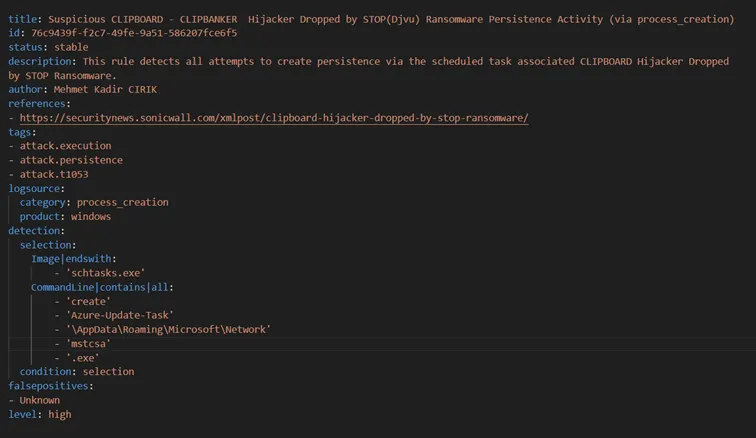
If you’re going to create a process_creation rule, you need to know the fields listed here. These fields are as follows.
- Log Name
- Source
- Date
- Event ID
- Task Category
- Level
- Keywords
- User
- Computer
- Description
- UtcTime
- ProcessGuid
- ProcessId
- Image
- FileVersion
- Description
- Product
- Company
- CommandLine
- CurrentDirectory
- User
- LogonGuid
- LogonId
- TerminalSessionId
- IntegrityLevel
- Hashes
- ParentProcessGuid
- ParentProcessId
- ParentImage
- ParentCommandLine
You can find all the fields under the Process creation category here.
6. File Event
This event is a log entry generated on the system when a file is created or modified. Information such as the file name, path, size, and timestamps is typically included in this event. Events like these are used for security purposes such as detecting and monitoring malware or unauthorized access attempts.
For example, if you’re going to write a rule in the “file_event” category like the one below, the related fields can be reached via sysmon event ID = 11.
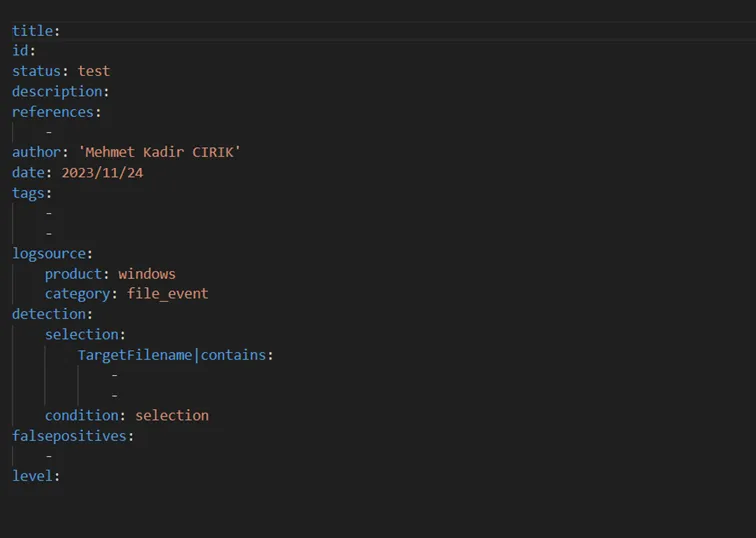
You can see the details of a sample “file_event” rule I wrote below.
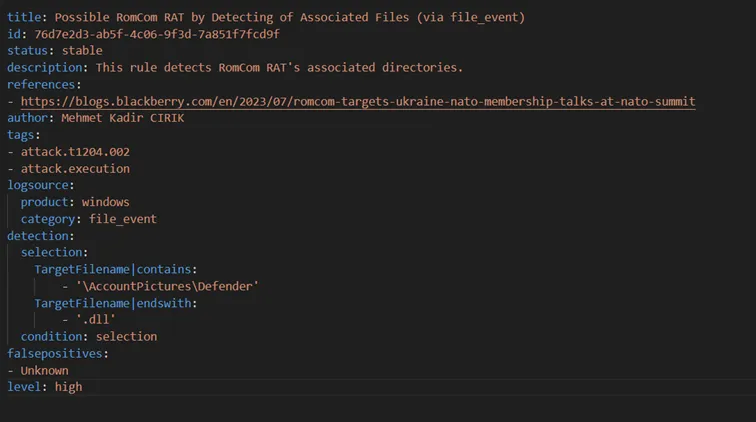
If you’re going to create a File_event rule, you need to know the fields listed here. These fields are as follows.
- Log Name
- Source
- Date
- Event ID
- Task Category
- Level
- Keywords
- User
- Computer
- Description
- UtcTime
- ProcessGuid
- ProcessId
- Image
- TargetFilename
- CreationUtcTime
You can find all the fields under the File_event category here.
7. Image_Load
Events like these are used to monitor changes made to the registry and to detect potential malware or unauthorized access attempts. When a registry activity is triggered, information such as the process that made the change, the key name, and the old and new values are recorded in the event log.
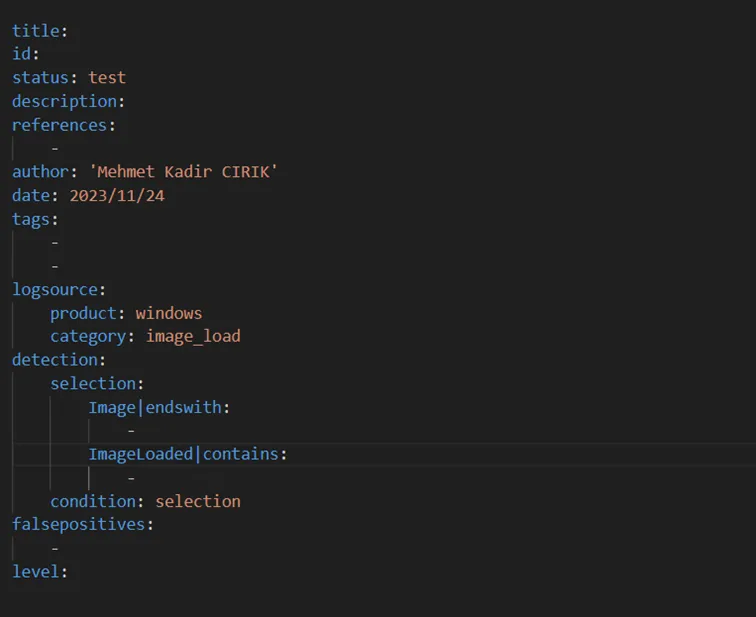
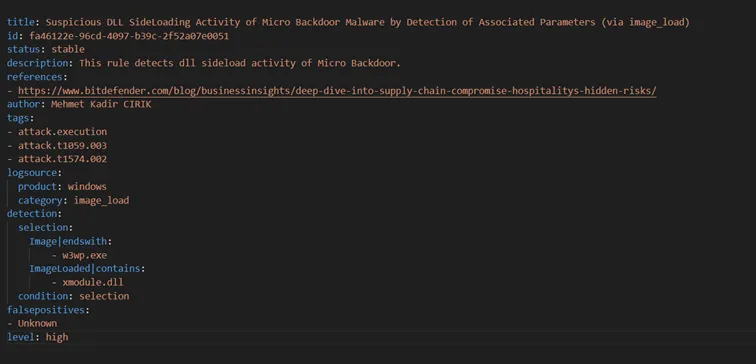
For example, if you’re going to write a rule in the “Image_Load” category like the one below, the related fields can be reached via sysmon event ID = 7.
Broadly speaking, the rule structure for the “image_load” category is as follows.
Below is a sample image_load rule I wrote earlier.
If you’re going to create a Sigma rule under the Image_Load category, you need to know the fields listed here. These fields are as follows.
- Log Name
- Source
- Date
- Event ID
- Task Category
- Level
- Keywords
- User
- Computer
- Description
- UtcTime
- ProcessGuid
- ProcessId
- Image
- ImageLoaded
- FileVersion
- Description
- Product
- Company
- Hashes
- Signed
- Signature
- SignatureStatus
You can find all the fields under the Image_Load category here.
8. Registry_Event
Events like these are used to monitor changes made to the registry and to detect potential malware or unauthorized access attempts. When a registry activity is triggered, information such as the process that made the change, the key name, and the old and new values are recorded in the event log.
For example, if you’re going to write a rule in the “Registry_Event” category like the one below, the related fields can be reached via sysmon event ID = 13.
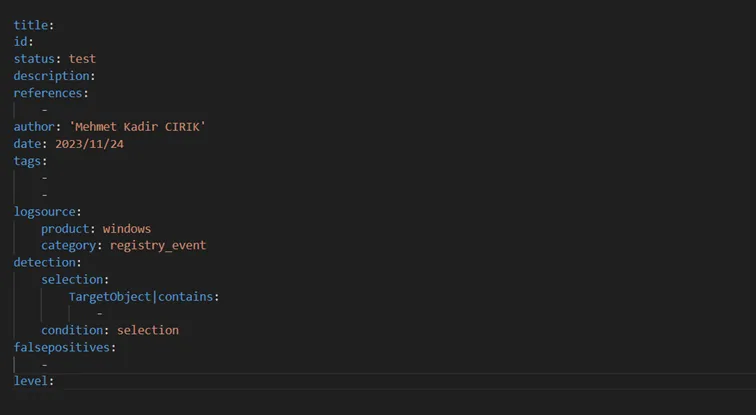
You can see the details of a sample “registry_event” rule I wrote below.
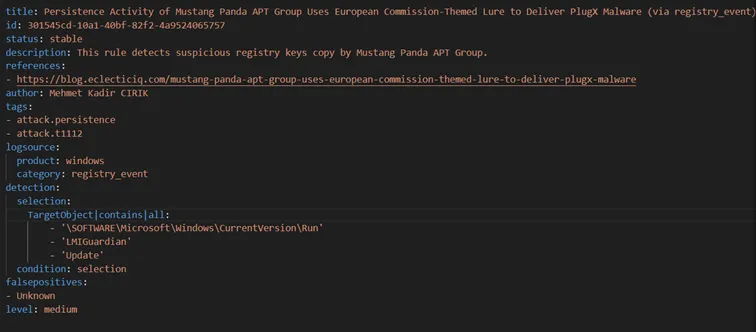
If you’re going to create a Registry_Event rule, you need to know the fields listed here. These fields are as follows.
- Log Name
- Source
- Date
- Event ID
- Task Category
- Level
- Keywords
- User
- Computer
- Description
- EventType
- UtcTime
- ProcessGuid
- ProcessId
- Image
- TargetObject
- Details
You can find all the fields under the Registry_Event category here.
9. Detecting an RDP Brute Force Attack with a Sigma Rule
The rule titled “RDP Brute Force Attack Detection” focuses on detecting requests made by attackers to the RDP (Remote Desktop Protocol) port on your network. Attackers typically try to bypass the firewall by carrying out RDP brute-force attacks against this port. This rule aims to help protect your network security by detecting potential RDP brute-force attacks at an early stage. Network security teams can use this rule to protect their networks against possible attacks targeting RDP and generate alerts when needed.
The full rule content is as follows;
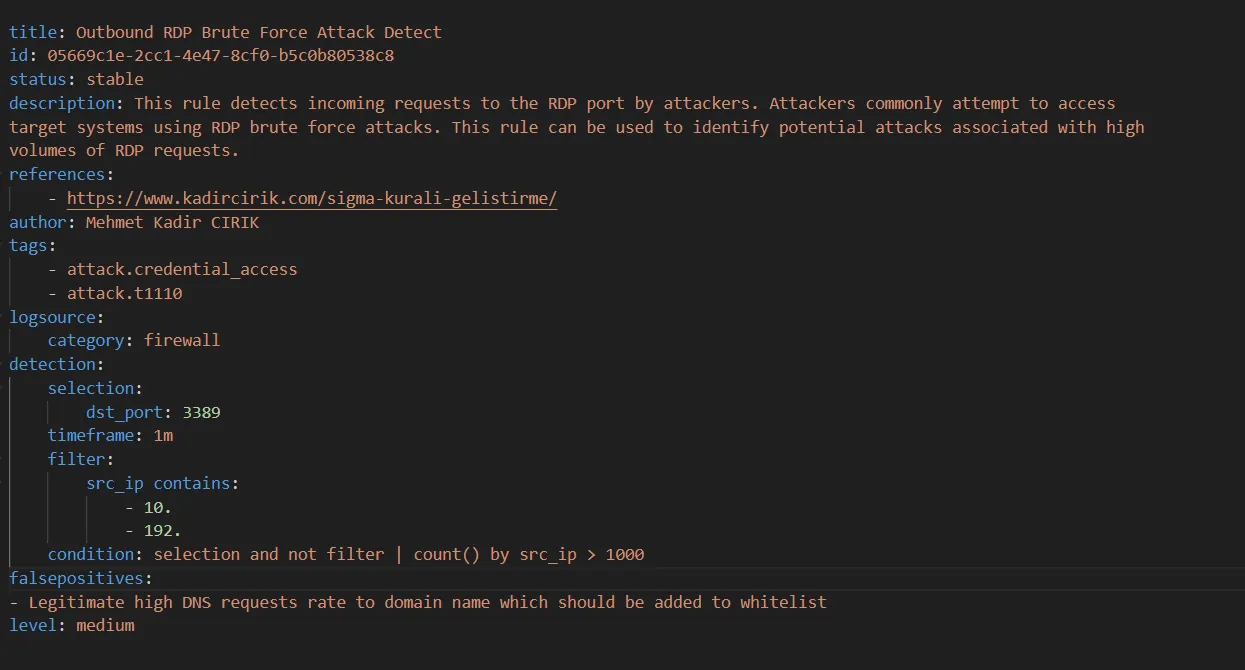
The rule steps are as follows, in order;
Rule Title: Outbound RDP Brute Force Attack Detect
Description: This rule is designed to monitor requests to the RDP port on the firewall and detect potential RDP brute-force attacks.
Step 1: Determining the Log Source:
This rule gets its information from firewall logs.
The firewall monitors and manages network traffic, which makes it an ideal source for monitoring RDP traffic.
Step 2: Selecting the Target Port:
The rule sets the destination port to 3389 in order to detect attacks targeting RDP.
Port 3389 is typically used for RDP traffic.
Step 3: Determining the Time Window:
The rule monitors requests to the specified target port within 1-minute time windows.
This is important for early detection of attacks.
Step 4: IP Address Filtering:
The rule applies a filter based on the source IP to filter specific IP ranges.
Local network IP ranges such as 10.x.x.x and 192.x.x.x are used as filtering criteria.
Step 5: Determining the Condition:
The rule tracks the number of requests to the target port within the specified time window.
If the number of requests from a single IP address exceeds 1000, it’s evaluated as a potential attack.
Step 6: Defining False Positives:
The rule identifies high DNS request volumes for a domain as a false positive.
In this case, it notes that such requests could be added to an allowlist.
Step 7: Determining the Alert Level:
The alert level for this rule is set to medium.
In other words, if such an attack is detected, it indicates that the severity of the event is considered medium.
10. Detecting the Disabling of Windows Defender Threat Protection with a Sigma Rule
This rule detects the disabling of Windows Defender threat protection. This plays an important role in identifying a potential security vulnerability that could occur on computers. The rule monitors the disabling of the Windows Defender service in association with certain event IDs and treats this situation as a high-severity threat.
The full rule content is as follows;
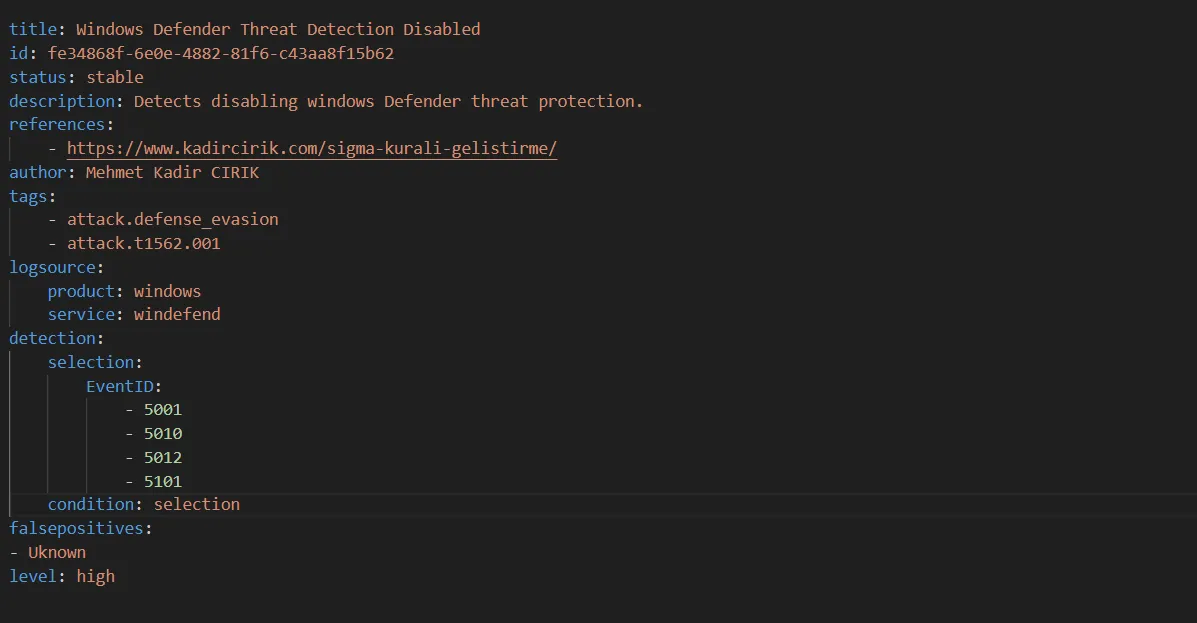
The rule steps are as follows, in order;
Determining the Log Source:
The rule detects threats using logs produced by the Windows operating system.
The Windows Defender service is a built-in antivirus and threat protection program found in Windows operating systems.
Event Selection:
The rule monitors events with certain event IDs (EventID): 5001, 5010, 5012, 5101.
These event IDs represent specific operations associated with Windows Defender being disabled.
Determining the Condition:
The rule triggers the threat when the specified event IDs are detected.
If the selected event IDs are logged, the rule detects this condition.
Defining False Positives:
The rule marks the false positive as “Unknown” to indicate what false positives might look like.
In this case, the conditions under which the rule might trigger incorrectly haven’t been predetermined.
Determining the Alert Level:
The alert level for this rule is high.
Since the disabling of Windows Defender can indicate a serious security vulnerability, the importance and urgency of this situation has been set to high.