Windows File Systems
In this article, I'll cover, in order: What a file is, the structure and working logic of a hard disk, File System, the Duties of a File System, the file structure in Windows Systems, FAT 16,…

Hello everyone, in this article I’ll cover, in order;
- What a file is,
- The structure and working logic of a hard disk,
- File System,
- The Duties of a File System,
- File structure in Windows Systems
- FAT 16,
- FAT 32,
- NTFS — these are the topics I’ll be covering. These topics are one of the important areas in terms of Digital Forensics.
What Is a File?
A file is the name given to the entirety of data stored on a disk.
There are two types of files in operating systems;
- Program files, which contain the commands that control the computer while systems are performing their tasks or while an application is running.
- Data files, which are created by users with the help of a program.
The Structure and Working Logic of a Hard Disk
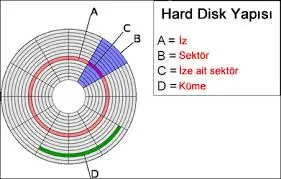
- Disks consist of concentric rings nested within each other. These rings are called tracks.
- Each ring is divided into sections within itself. These sections are called sectors.
- Since disks use magnetism, gaps are left so that adjacent sections don’t interfere with each other.
Saving files to the hard disk is the job of the file system. The file system doesn’t use an entire sector all at once; instead it groups them into what are called clusters.
What Is a File System?
The system that controls how a file is stored on a disk and how a computer provides access in order to manage files is called the file system. Every file system contains designated areas and directories, and for a storage device to be usable, it must use some type of file system. Today, the NTFS file system is more commonly used on flash drives, hard disks, and memory cards.
The management of data kept outside of main memory, on secondary storage (e.g., a hard disk), is handled within the scope of the file system.
To this end, organizing secondary storage, allocating space for files, tracking free space, and arranging the placement of files on secondary storage so that access is as fast as possible are all duties of the file system.
Duties of the File System
In addition to this, ensuring the security of files stored on the system is also mandatory. Therefore, determining and controlling access and sharing rights for files must also be handled by the file system.
- The file system is a way of saving data to an environment where it can be organized and managed.
- Every physical medium that holds data (e.g., a hard disk) consists of a sequence of small units that store/hold information, known as “blocks”.
- Each file system manages these blocks differently.
The File Structure of Windows Systems
Different versions of the Windows operating system use different file systems.
These are;
- The MS-DOS operating system uses FAT 16,
- The Windows 95/98 operating system uses FAT 32,
- The Windows NT/2000/XP/Vista/7/8 operating systems use the NTFS file system.
FAT 16 (File Allocation Table)
- The DOS operating system and early versions of Windows used the FAT (File Allocation Table) file system.
- In the FAT file system, file locations are kept in the master file table (MFT).
- It was named FAT 16 because it’s a 16-bit file system.
- DOS and all versions of Windows support this file system.
- In this file system, a file can be at most 2GB in size, and data access is very fast for partitions smaller than 256 MB.
- There is no data security.
As FAT16 became obsolete, FAT 32 was developed as the final version of the FAT file system, intended for use in more advanced operating systems.
FAT 32 (File Allocation Table)
- The Windows 95/98/ME/2000/XP/Vista/7/8 operating systems support this file system.
- FAT 32 has more advanced data protection methods than FAT 16.
- Disk partitions need to be larger than 512 MB.
- While the FAT 16 file system can hold a maximum of 512 files/folders in the root directory, FAT 32 can hold as many files/folders as desired.
NTFS (New Technology File System)
This is a file system developed to replace the FAT file system, which was used for a long time in older Windows operating systems. While NTFS stores file locations in a master file table just like the FAT system, it also separately stores the locations of files and other information within each cluster, offering a more reliable structure.
- Windows versions using the NTFS file system can see FAT drives and read files on those drives. However, systems using the FAT file system cannot see NTFS partitions.
- Access can be controlled by assigning user rights to files and directories.
- It keeps a record of all changes made to files, which is why data recovery is possible.
The most important security elements found in the NTFS file system are divided into a few parts;
- Secure System Logon: Before working on the system, users must identify themselves by entering a valid username and password.
- Access Control: The owner of a resource determines who can access a file or a specific part of it. For this, they can grant access rights to users or groups.
- Auditing Functions: NTFS can identify events that are important for security and record them in a log file. The same applies to creating, accessing, and deleting system resources.
- User Management: It can be determined which user performed any given file event.
- Memory Protection: If a program doesn’t have the necessary authorization, it cannot access the memory space used by another program. This prevents other software from reading files in that memory space.